Templates / Vocal Chain for Pro Tools
VOCAL CHAIN
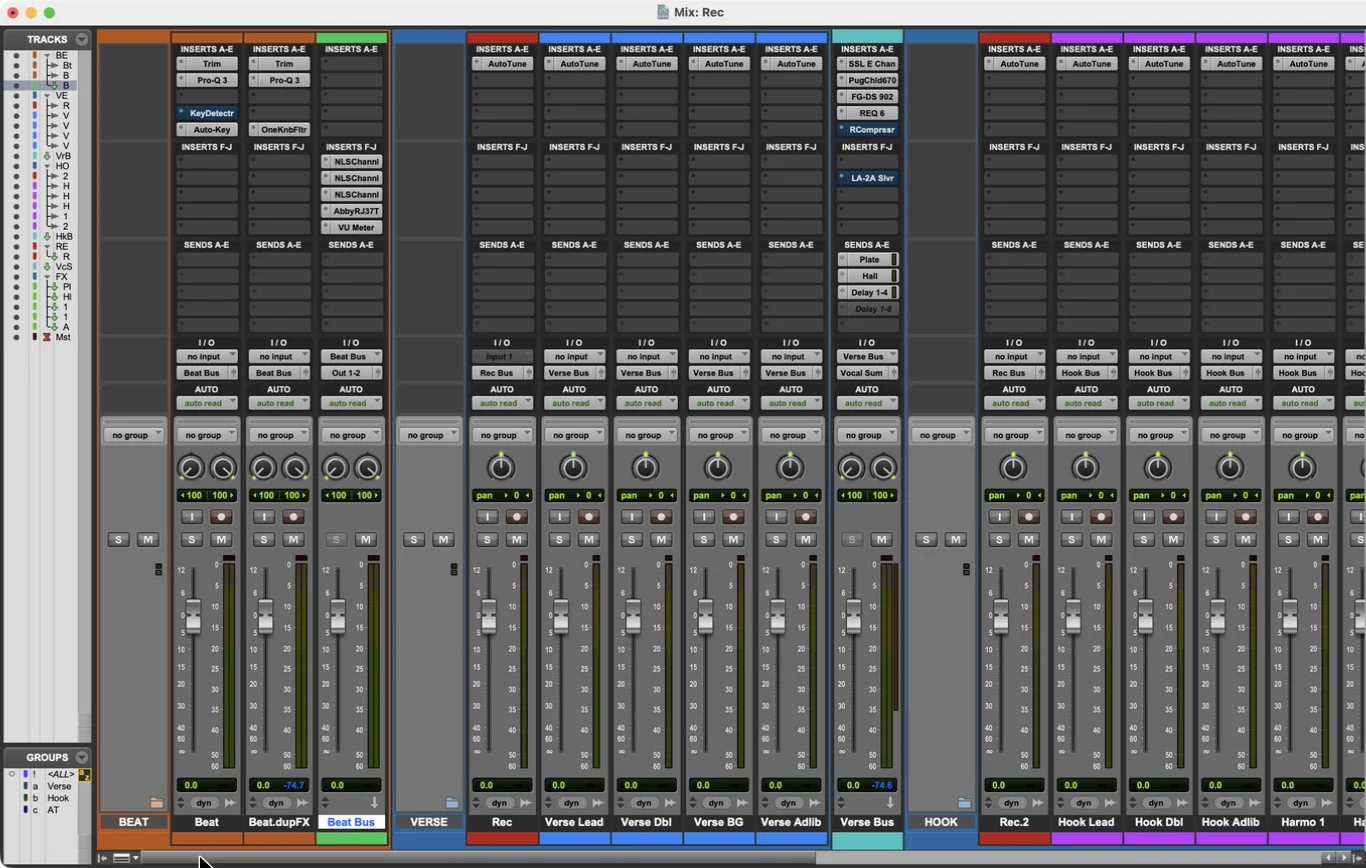
The vocal session we record and mix in at The Mix Room, ready to open in Pro Tools. Every track, bus, send and plugin chain is already in place: load the beat and start recording.
- 13 audio tracks in Beat, Verse, Hook and Rec folders
- 10 aux buses with plate, hall and synced delays
- Groups and markers ready to go
- Pro Tools session template (.ptxt), macOS and Windows
- Pro Tools 2023 or later
See it in action
A raw take from the booth, the same take through the template, then the finished song: T.D.M #1 (feat. Montero xix).
Hear it
A raw sung vocal, then the same take bounced straight out of the Vocal Chain template. Switch while it plays.
Walk through the session
A guided tour of the template as you open it in Pro Tools. Click the picture or the arrows to move on.
How the signal flows
Every vocal track lands on its own bus, the buses feed the plate, hall and delays, and everything meets in the Vocal Sum before the master. Play the vocal above and watch it move.
Inside Vocal Chain
BEAT
Beat track and a duplicate for effects, both into the Beat Bus with channel saturation, tape and a VU meter.
VERSE
Rec, lead, double, backing and ad-lib tracks with Auto-Tune, into a Verse Bus: channel strip, compression, de-esser, EQ and leveller.
HOOK
The same layout for the hook, with two harmony tracks and a Pultec-style EQ on the Hook Bus.
REC
A Rec Bus for live takes, then a Vocal Sum that glues every vocal bus together.
FX
Plate, hall, quarter-note and eighth-note delays synced to the session tempo, returning on an All FX bus.
MASTER
Bus compressor, tape machine, saturation and clipper on the master, with a limiter ready but bypassed.
Plugins used
The template uses these third-party plugins, which are not included. If one is missing, its slot shows as inactive and the rest of the session works normally.
In the download
- TEMPLATE
- The Pro Tools session template, 126 BPM, 4/4.
- PLUGIN LIST
- Every plugin, track by track, so you can swap in your own.
- READ-ME
- Where to put the file so it shows up in Pro Tools’s template menu.
Questions
Which version of Pro Tools do I need?
Pro Tools 2023 or later (Artist, Studio or Ultimate), on macOS or Windows.
How do I install it?
Unzip the download, then in Pro Tools open the Dashboard, tick Create from Template and use Import Template to add the .ptxt file. It then stays in your template list.
Are the plugins included?
No. The template uses the third-party plugins listed above. If you do not own one of them, its slot is simply inactive: replace it with a plugin you have.
Can I use it in my releases and for clients?
Yes. Use the template for your own music and your clients’ sessions as much as you like. Please do not share or resell the template file itself.
How do I receive it?
Right after payment you receive an email with a download link, valid for 14 days. It contains the template, the plugin list and a short install guide.
Can I get a refund?
The template is a digital file delivered immediately. If it does not open in a supported version of your software, write to us: we fix it or refund you.