Plugins / Aura
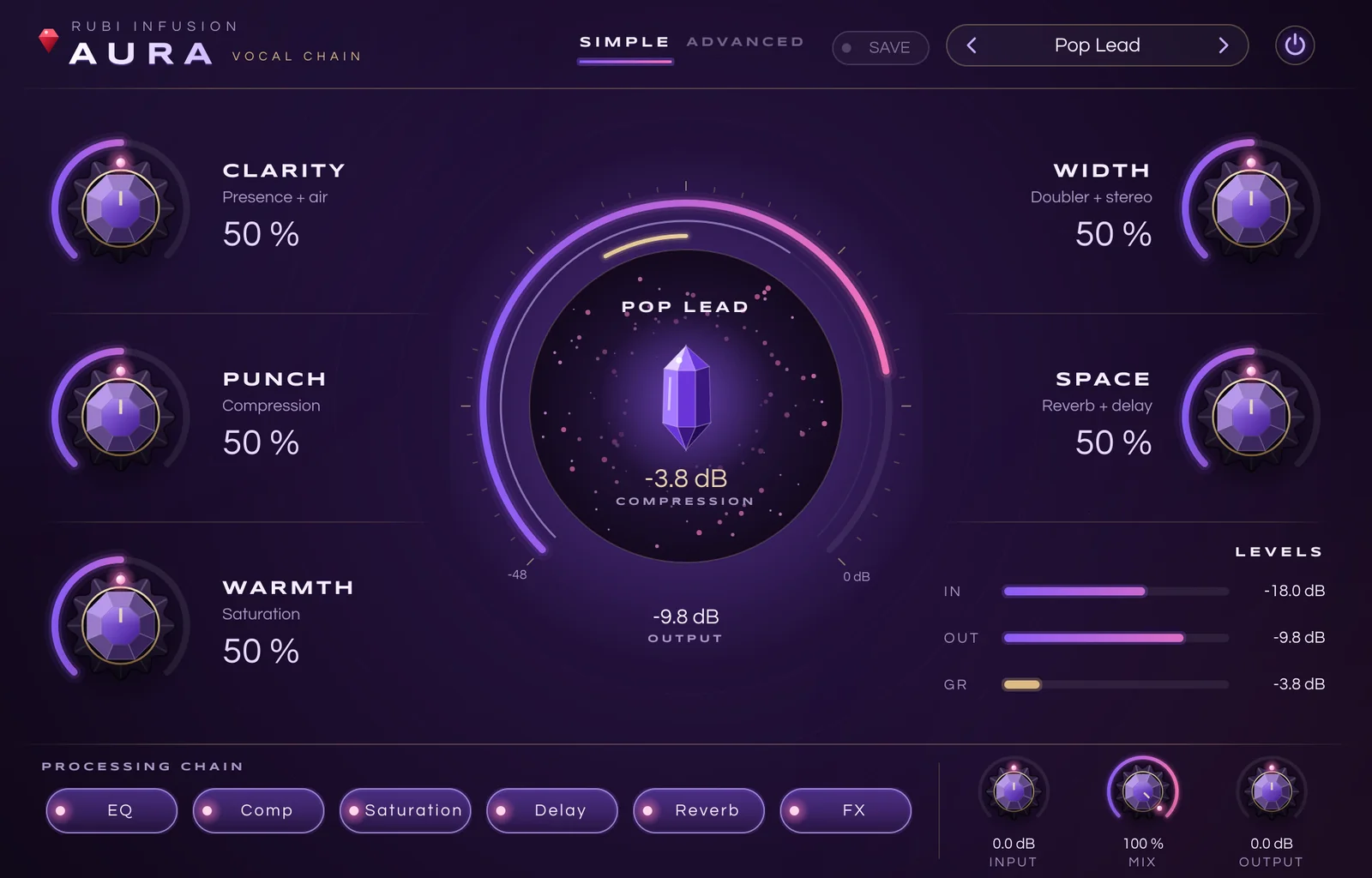
AURA
Six processors, five macros, one window. From a raw take to a finished lead vocal, fast.
- Opto and FET compressors in one plugin
- Vintage hall reverb, delay, doubler and flanger
- 9 factory presets, plus your own
- AU · VST3 · macOS 10.13+ · Intel & Apple Silicon
- 14-day free trial · licence for 2 computers
Inside Aura
Vocal EQ
Low cut, body, presence and air, each with its own frequency, tuned for the voice.
Compressor: Opto or FET
Opto: a smooth optical cell with a slow two-stage release, in Compress or Limit mode. FET: fast attack from 800 to 20 microseconds, ratios 4, 8, 12, 20 and ALL for aggressive vocals.
Analog saturation
Tube, Tape and Transformer, oversampled and level-matched, so Drive changes the colour and not the volume.
Tempo-synced delay
1/16 to 1/2 with dotted values, ping-pong, filtered feedback and ducking that clears the way for the vocal.
Vintage Hall
A lush hall in the spirit of classic 80s digital reverbs: dense, chorused tail, darker highs, pre-delay and ducking.
FX: doubler and flanger
Last in the chain. Two detuned voices with stereo width, and a stereo flanger with rate, depth and feedback.
Five macros
- CLARITY
- Presence and air
- PUNCH
- Compression amount, Opto or FET
- WARMTH
- Saturation drive and blend
- WIDTH
- Doubler and stereo width
- SPACE
- Reverb and delay
Presets
Save your own presets with one click. They show up in every session and every DAW.
Questions
Which music software does it work in?
Any macOS host that loads AU or VST3 plugins: Logic Pro, Ableton Live, Studio One, Reaper, Cubase, FL Studio, GarageBand and more. An AAX version for Pro Tools is on the way. Windows is not available yet.
Is there a free trial?
Yes. The plugin runs with every feature for 14 days. After that it keeps working but goes silent for one second every forty seconds until you activate a licence key.
How many computers can I use it on?
Two computers that you own or use. To move your licence, click Deactivate in the plugin’s licence window on the old computer, then activate on the new one.
How do I activate my licence?
After payment you receive an email with your licence key. Open the plugin, click the licence button, paste the key and click Activate. An internet connection is needed only for that moment.
Can I get a refund?
If the plugin does not work on a supported system and we cannot fix it, you are refunded within 30 days. See the refund policy for details.